


Implementing an Evolving Composition in FMOD
- Apr 27, 2021
- 3 min read
This blog is about the prototype/demo game I created called 'Shift Blade'. To find other posts about this project look for post tagged with Shift Blade.
For the music of this game I took inspiration from the battle themes in Devil May Cry 5, an action game made by Capcom. I wanted the track to flow in between states, from just walking around to seeing enemies in the distance and then fighting them head on, somewhat similar to what can be found in DMC5's rank-based music.
After creating the base version of the composition I then extracted loop-able sections as well as dynamic little sound bites for a bit of added randomness. I had to create a few variations in the main fighting part of the track otherwise hearing the exact same loop over and over while in combat would get exhausting for the listener. Its worth noting that this style is best suited toward short, frantic fights where as a long boss battle might get a unique, full composition instead.
Quick tip: A fast way to create a seamless loop out of anything is to chop the file in half and put the end at the front, then blur and blend the middle with a seperate instance of the same file with fades and automation. This works well with high-quality file formats like .wav as the waveforms will match up exactly when looped back around. Make sure to add a tempo marker with your tracks BPM to make slicing and stitching clips easier and more precise!

I created nested events to house these main loops which also then allowed me to add multi-instruments which randomly trigger extra sounds to keep it interesting. This was also done so that I could apply AHDSR to the entire section which I used mainly for the attack and release volume so that sections of the track would nicely fade into each other (or not, depending on how I wanted it).
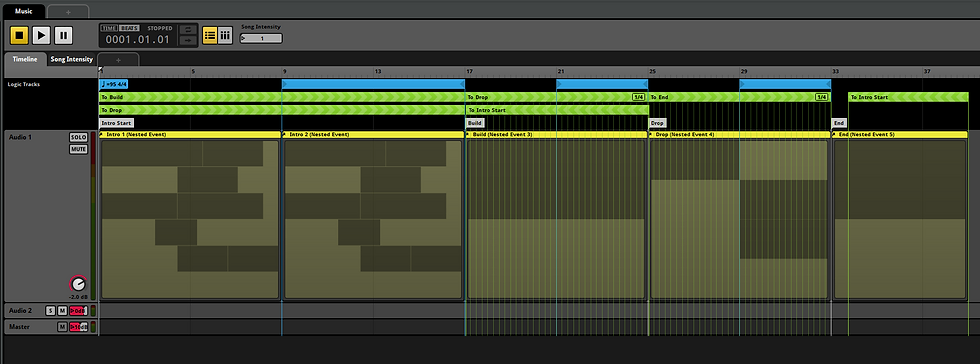
Transition regions and markers are the best method for moving from one part of the song to another. When given parameters, such as "song intensity" in this case (basically if you are near enemies or attacking them etc) they will transition to different sections of the track, as the name suggests. If there are no parameters matching an output, the loop region continues to do its thing and loop around the same section.
Quick tip: You can apply quantization intervals to a transition region which forces it to wait until a specified note or bar which can help smoothen the transition between regions instead of being instant and abrupt. This works well for electronic music in particular where the drum beat is the driving force; it may sound great to try and match up the rhythm when transitioning between parts.

I made sure to add some variance in the multi-instrument playlist by adding modulators. When a clip is played it will also select add additional randomness such as volume, pitch and offset within the bounds you set. When combined with the playlist chance percentages, this not only gives you more control on which sounds you want to hear most often but also adds more flexibility and spice. This is more commonly used for sound-effects rather than music as pitch and offset can completely ruin a well-made track, but don't be afraid to experiment.

Finally, I hooked up the music to Unity and controlled the parameters using a script. You can find out how I did this is another post: Parameters and Snapshots in FMOD.
Comments